What it actually does
The week is already on the invoice
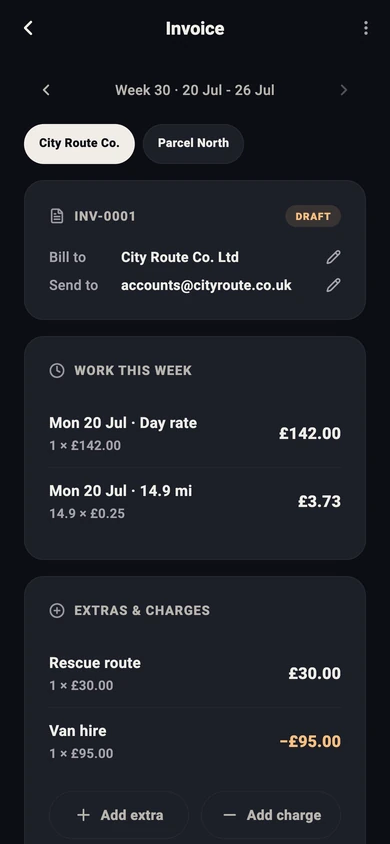
Set how you're paid once: a day rate, an hourly rate, a per-mile rate, or a mix. Every shift you track adds its lines to that week's invoice for that company. A day at £142 with 14.9 miles at 25p shows up as two lines without you typing either.
Extras on, deductions off
Did a rescue, got a bonus, or covered an extra route? Add it as an extra. Van hire, damage excess, a fine or anything else taken off your pay goes in as a charge. The total works itself out, so the number you send matches the number you expect back.
A reminder on invoice day
Pick the day and time you invoice, say Friday at 6pm. If you worked that week and the invoice hasn't gone yet, Rydealog sends one reminder with the total, and tapping it opens the invoice.
Sent from the app, as a proper PDF
Save each company's bill-to name, address and email once. Your business name, UTR, bank details, payment terms and VAT number (if you have one) go on every PDF. Invoice numbers count up on their own (INV-0001, INV-0002…), and each week sits in your invoice history.
How it works
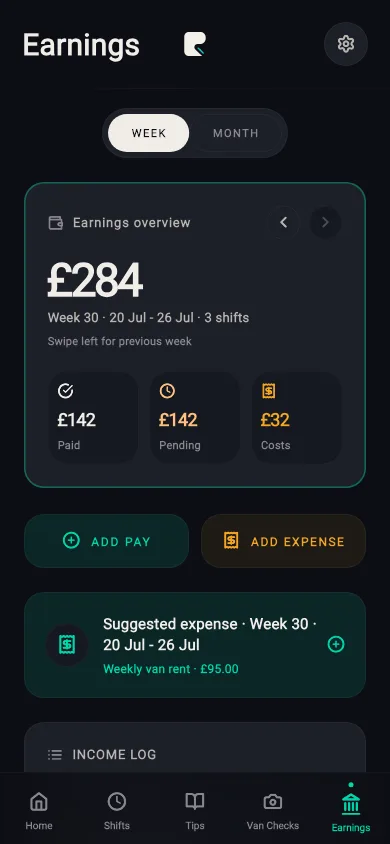
- Set your pay once. Day rate, hourly or per mile in Earnings, plus your invoice details and bank account.
- Track your shifts. Start and end shifts as normal. Each one lands on that week's invoice.
- Check, adjust, send. Open the week, add extras or charges, then tap Send invoice. The PDF opens in an email to the company you work for.
Honest limitations
- It invoices what you tracked and what you add. If a shift wasn't tracked, add it as an extra.
- One invoice per company per week. If you work for two companies, you get two invoices.
- Rydealog doesn't take payments or chase late payers. The invoice tells them where to pay you.
- Not tax or accounting advice. Check VAT and tax questions with an accountant.
- iPhone only for now. Independent, and not linked to any courier company.
FAQs
Is the invoice feature free?
Yes. Weekly invoices are free in Rydealog, with no subscription needed. Pro is only for things like unlimited Delivery Tips, Mileage Pay Check, exports and van check history.
Where do the invoice lines come from?
From the shifts you track in the app, using the day rate, hourly rate or per-mile rate you set once in Earnings. Each tracked day adds its lines to that week's invoice for that company. You can add extras and deductions on top.
How do I send the invoice?
Tap Send invoice. Rydealog builds a PDF and opens an email to the address you saved for that company, with the PDF attached. If Mail isn't set up on the phone, the share sheet opens instead. You can also just download the PDF.
Is my bank and invoice data uploaded anywhere?
No. Your invoice details, bank details and invoices are stored on your phone, not on Rydealog's servers. The PDF only goes where you send it.
Is this tax or accounting advice?
No. Rydealog produces an invoice from the numbers you enter and the shifts you track. Check it before you send it, and speak to an accountant about VAT or tax questions.
More from Rydealog
Hours and miles behind the invoice: courier mileage tracker. Paid for the miles you drove: mileage pay check. What you can claim: self-employed courier expenses. Work out a day's pay: round pay calculator.

Free on iPhone. Invoicing is free. Android coming soon.